



Menus & Submenus

Home
Site Layout
On Each Page
Linking Content
Resources

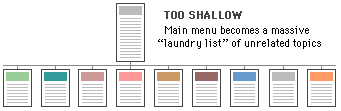
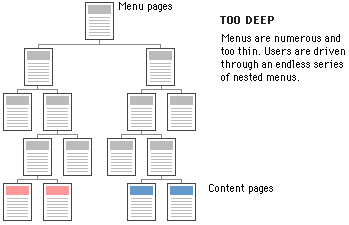
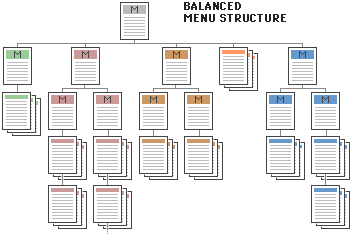
Once the Navigation Structure has been determined, pages will need to be arranged into menus and submenus.  The end-user should be kept in mind during this process to remind you not to make navigation menus too shallow, resulting in long lists of links, or too deep, resulting in the need to click through several pages to arrive at the desired content.

The Yale Style Manual offers three graphics that illustrate this.

Diagram of a shallow site hierarchy. Diagram of a site hierarchy that is too deep.

Diagram of a well-balanced site hierarchy.

From: http://www.med.yale.edu/caim/manual/sites/site_elements2.html

There are several other points to keep in mind when constructing your menus, many of which will apply to other areas of your web site construction.  Beaumont et. al. list Twelve Web Menu Rules in their Web Menu Usability.  They state that Menus must:

  1. be considerate of the user's main task.
  2. be distinct from content.
  3. be clearly readable (this includes visual contrast and text and icon size).
  4. be easily scanned for information.
  5. be easily operated.
  6. behave as your target user would expect.
  7. load as quickly as possible.
  8. be consistent across a site.
  9. put a higher premium on usability than branding.
  10. be localizable.
  11. be accessible to the handicapped.
  12. work on multiple browsers.
 

Related Topics:
Site Structures
Primary & Secondary Navigation
Menus & Submenus
Clear Navigation
Site Metaphor

Questions? Comments?  Do I practice what I preach? Contact me at afensie@attbi.com.
Organizing Your Web: A Guide to Creating Intuitive Navigation Structure was created by Anne Fensie for IT522 at Bridgewater State College.
Copyright 2002
Last updated October 03, 2006